
NetSleep
System Administration & NetworkDescription
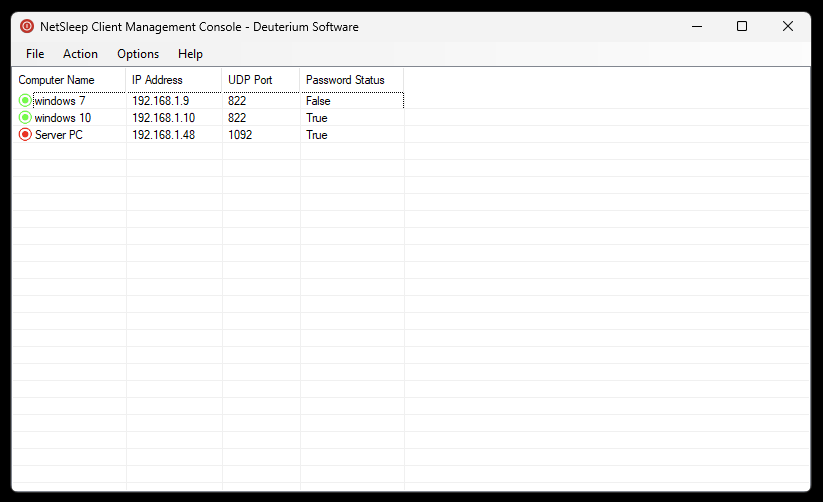
NetSleep is a cross platform (Windows and Linux) Sleep-on-LAN and remote shutdown tool. NetSleep works on UDP and it can shutdown, restart, sleep, hibernate, log off, lock and send message computers. It is named as "Sleep-on-LAN" tool but if you forward UDP ports on your router, it can also work as Sleep-on-WAN tool. This tool can be useful for both system administrators and normal computer users for shutting down computers remotely. It is easy to use. It has a security password - token system for preventing others from managing your system. It uses UDP so it does not waste bandwith or system resources with an always open TCP socket. You can use GUI and CLI for remote management. The application has also updater component. This application requires .NET Framework 4.7.2 and Windows 7 or a later operating system. Linux version requires dotNet 6.0.
Features
- Remotely manage devices on LAN and WAN.
- Easy to use Interface.
- Minimal resource usage, and uses service.
- Security system and password.
- Automatic update system.
File Verification & Safety
To make sure that the tool is downloaded properly, you can check the file SHA-256 hash.
Disclaimer: This free software is provided "as-is" without warranty of any kind, express or implied. The developer assumes no liability for data misplacement or system damage resulting from improper deployment or system anomalies this tool can cause.
Change Log
v1.3.0 - Released: 24/10/2026:
[+] New Features:
• Added search/filter feature. You can now enter keywords to search.
• Added sorting feature.
• Status bar now shows the amount of selected computers.
• Added placeholders to textboxes.
• Added Remove Password feature. You can now directly remove password from the server using the Client.
[*] Fixes and Improvements:
• Fixed a problem that forced the application to use TLS 1.2.
• Fixed tab indexes at Add Computer form.
• Fixed a problem that caused Server Configuration Tool to exit after saving configuration.
• Several visual fixes.
• Various bug fixes and improvements.
v1.2.1 - Released: 07/09/2026:
[*] Fixes and Improvements:
• The server setup now creates server allow inbound rule automatically.
• Seperated Client GUI and Server update checks.
• Fixed multiple instance problem on Client GUI.
• Various bug fixes.
v1.2.0 - Released: 23/08/2026
[+] New Features:
• Added the ability to change server password from client. You can also remove the password by setting it to empty.
• Added status strip for showing the amount of computers.
• The server now uses a setup file instead of being portable.
[*] Fixes and Improvements:
• Fixed false positive problems.
• You can now use F5 to refresh connection status.
• GUI now shows computer nickname instead of IP on password request.
• Fixed password dialog label not being wide enough for text.
• Added "Check Connection" to right-click menu.
• General bug fixes.
[X] Removed Features:
• Removed "Uninstall Server" option since the server now uses a setup file.
v1.1.0 - Released: 10/07/2026
[+] New Features:
• Added the ability to send messages to the server. Messages also work in the log screen.
• Added Update feature to the NetSleep Server Configuration Tool (includes updating instructions).
→ To update the server: uninstall it via the tool, download the latest server exe, and install via the tool again.
[*] Fixes:
• Fixed client update problem on Windows 7.
• Fixed visual glitches and general bugs.
v1.0.0 - Released: 07/07/2026
• Initial release.
Note About Help File
By default, Windows restricts downloaded files from the internet. Due to this, the help file might not work properly. To fix this problem, open the properties page of the help file and click Unblock. See FAQ page for more information.
Software Details
| Programmer: | Emir Alp Koçak |
| License: | Freeware |
| Version: | v1.3.0 |
| Platform: | Microsoft Windows & Linux |
| Language Support: | English |
| Release Date: | 07/07/2026 |
| Last Update: | 24/10/2026 |
| Architecture: | Any CPU |
| Installation: | Setup & Portable |