
Mouse Brightness Control
Desktop UtilityDescription
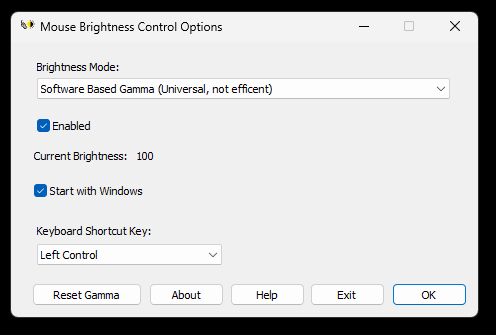
Mouse Brightness Control is a monitor and screen brightness controller tool for Windows. Instead of settings menu, Mouse Brightness Control lets you adjust your screen brightness by holding a key that you choose and scrolling your mouse wheel. Scroll up to increase brightness and scroll down to decrease. This way, you can directly adjust your brightness without opening settings. The tool supports three modes. First, WMI for laptop screens. This adjusts the screen brightness for laptop screens and some special monitors. Not all external monitors support this. Second, DDC/CI based for external monitors. This option uses Monitor Configuration API to adjust monitor brightness. This option requires your monitor, cables to support DDC/CI and ODS option to be enabled. You may need to disable HDR. Not all monitors and cables support DDC/CI. Third, software based gamma for all devices. This options works on both laptops and monitors without any requirement. The problem is, it does not actually decrease backlight, power usage, and blue light. Use this only if you are sure that your system does not support option one or two. The application supports 10 different keys for setting the brightness level. This application requires Windows 7 or a newer operating system.
Features
- Three different modes for laptop and PC.
- Easy to use.
- Ten different key choices for setting the brightness.
- Ability to set gamma brightness for systems that don't have brightness feature.
- Coded using C, making it compatible and efficent.
- Can start with Windows automatically.
File Verification & Safety
To make sure that the tool is downloaded properly, you can check the file SHA-256 hash.
Disclaimer: This free software is provided "as-is" without warranty of any kind, express or implied. The developer assumes no liability for data misplacement or system damage resulting from improper deployment or system anomalies this tool can cause.
Change Log
v1.2.0 - Released: 23/08/2026
[+] New Features:
• Added custom shortcut modifier keys. Users can now hold one of the following keys while scrolling the mouse wheel to adjust brightness:
– Caps Lock, Left Alt, Left Control, Left Shift, Left Windows
– Right Alt (AltGr), Right Control, Right Shift, Right Windows, Scroll Lock
(Additional key support planned for future releases).
v1.0.1 - Released: 17/08/2026
[*] Fixes:
• Fixed gamma brightness not matching the system reset ramp.
• Fixed synchronization issue between gamma brightness levels and the current level label when using extreme gamma values.
• Fixed an issue that caused screen whitening or blackouts while operating in gamma mode.
v1.0.0 - Released: 12/08/2026
• Initial release.
Note About Help File
By default, Windows restricts downloaded files from the internet. Due to this, the help file might not work properly. To fix this problem, open the properties page of the help file and click Unblock. See FAQ page for more information.
Software Details
| Programmer: | Emir Alp Koçak |
| License: | Freeware |
| Version: | v1.2.0 |
| Platform: | Microsoft Windows |
| Language Support: | English |
| Release Date: | 12/08/2026 |
| Last Update: | 23/08/2026 |
| Architecture: | x32 and x64 |
| Installation: | No (Portable) |