
DeepTaskScan
ForensicsDescription
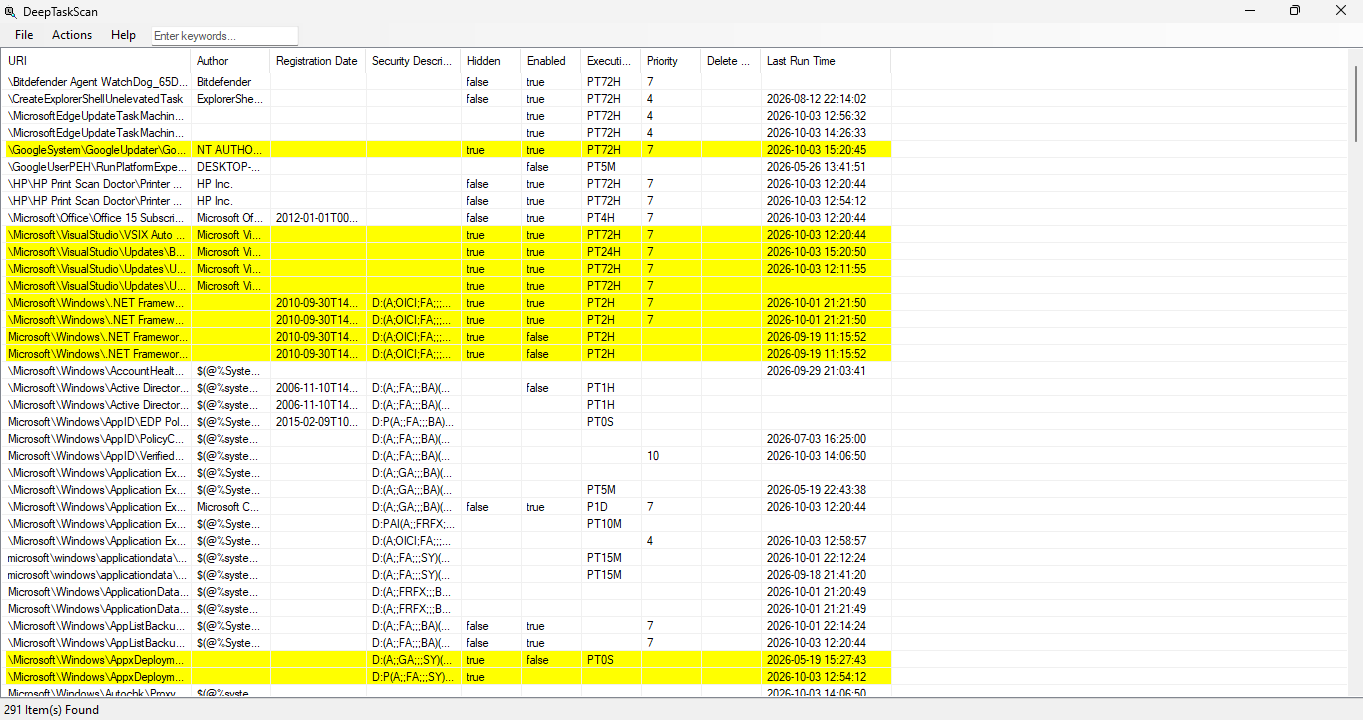
DeepTaskScan is an advanced Windows scheduled task viewer forensics tool. Unlike other tools such as: Task Scheduler, schtasks and PowerShell, DeepTaskScan uses a very different method to deeply scan scheduled tasks. Several state-backed APT (Advanced Persistent Threat) groups have used several advanced methods to hide scheduled tasks completely from the operating system via deleting tasks files and registry keys. DeepTaskScan is designed to detect scheduled tasks in Windows, even if they got hidden by several techniques. This way, the tool can help system administrators and users to detect those hidden tasks in their computer. This tool does not use Windows API calls to detect scheduled tasks, as hackers can fool them via this logic. The application can also save window position and size for a better user experience. You can also use the search bar for searching/filtering tasks. This application requires .NET Framework 4.7.2 and Windows 7 or a newer operating system.
Features
- Detect any hidden scheduled task via advanced scanning system.
- Highlight hidden or persistent entries.
- Search feature for filtering tasks.
- Ability to extract information to a file.
- Can be used for detecting APT that uses hidden task scheduler entries.
- Can detect much more entries than Task Scheduler, PowerShell and other tools.
File Verification & Safety
To make sure that the tool is downloaded properly, you can check the file SHA-256 hash.
Disclaimer: This free software is provided "as-is" without warranty of any kind, express or implied. The developer assumes no liability for data misplacement or system damage resulting from improper deployment or system anomalies this tool can cause.
Change Log
v1.2.0 - 03/10/2026:
[+] New Features:
• Added search feature. You can now enter keywords to search/filter tasks.
• Added Last Run Time column for better forensics and diagnostics.
• The application has now the ability to sort according to column. You can click columns to sort. It is also saved to the configuration file.
• Task XML files that cannot be parsed are now highlighted with red.
[*] Fixes and Improvements:
• The Select Hidden Items option now also selects hidden tasks that are highlighted red.
• Open XML File now opens the file correctly even if the task URI differs from the file name.
• Several bug fixes and improvements.
v1.1.0 - 20/08/2026:
[+] New Features:
• The application now saves window position, size and style to the configuration file and loads them back when the application starts.
• The application now saves column width to the configuration file and loads them back when the application starts.
• The application now saves Highlight Hidden Items setting to the configuration file.
v1.0.0 - 16/08/2026:
• Initial release.
Note About Help File
By default, Windows restricts downloaded files from the internet. Due to this, the help file might not work properly. To fix this problem, open the properties page of the help file and click Unblock. See FAQ page for more information.
Software Details
| Programmer: | Emir Alp Koçak |
| License: | Freeware |
| Version: | v1.2.0 |
| Platform: | Microsoft Windows |
| Language Support: | English |
| Release Date: | 16/08/2026 |
| Last Update: | 03/10/2026 |
| Architecture: | x32 and x64 |
| Installation: | No (Portable) |