
ClickShield
SecurityDescription
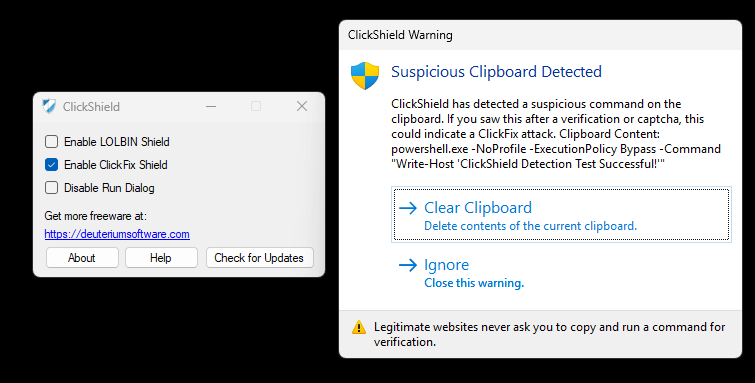
ClickShield is a ClickFix and other related phishing attack blocker for Windows. ClickFix and other similar types of fake captchas copies malicious commands to your clipboard and asks for the user to open the Run box (Windows + R) or paste them to the Command Prompt to complete the verification. When you run that command, your computer gets infected with malware. Those commands usually use LOLBINs in Windows: such as mshta, bitsadmin, wmic, regsvr32 etc. They also use PowerShell with encoded commands. ClickFix monitors your clipboard for changes and when it detects suspicious text in your clipboard, such as powershell -e , mshta http://example.com it alerts the user and blocks the Run dialog from opening. You can also use the LOLBIN Shield feature for blocking LOLBINs from accessing the internet, providing some protection againt common ClickFix attacks without affecting your computer usage. You can also completely disable the Run dialog in Windows, which can be used by system administrators to disable the Run dialog on employees' computers. This application requires .NET Framework 4.7.2 and Windows 7 or a newer operating system.
Features
- LOLBIN Shield for blocking several LOLBINs from accessing the internet.
- ClickFix Shield for monitoring clipboard for suspicious text and commands.
- Tray icon for easy control.
- Ability to disable Run dialog completely.
- Minimal memory usage.
- Useful for protection against ClickFix and other similar fake captcha attacks.
File Verification & Safety
To make sure that the tool is downloaded properly, you can check the file SHA-256 hash.
Disclaimer: This free software is provided "as-is" without warranty of any kind, express or implied. The developer assumes no liability for data misplacement or system damage resulting from improper deployment or system anomalies this tool can cause.
Change Log
v1.3.0 - 07/11/2026:
[+] New Features:
• The application now uses a score based system for detection.
[*] Fixes and Improvements:
• Improved detection system to catch more advanced and obfuscated ClickFix attack commands.
• Decreased false positives.
v1.2.1 - 04/09/2026:
[*] Fixes and Improvements:
• The alert message now stays on top of all windows instead of launching on the browser. This way it protects itself from ClickFix attack variants that attempt to close it and CrashFix attacks that crash the browser. The alert message remains visible until the user closes it.
• The alert message is now protected against ESC and ALT + F4 keys. This way it is protected from scripts that attempt to close it and it prevents collision with macro software.
• Fixed a problem that caused issues on terminal freezing system.
• Various bug fixes.
v1.2.0 - 01/09/2026:
[+] New Features:
• Added a tray icon to the ClickShield Clipboard Supervisor.
• Added the ability to disable the ClickFix Shield temporarily from the tray icon right click menu.
• Added the ability to exit from ClickShield Clipboard Supervisor using the tray icon right click menu. It disables ClickFix Shield until restart if you don't start it manually.
• Added the ability to show the GUI from ClickShield Clipboard Supervisor using the tray icon right click menu.
• Added the ability to check if the ClickShield Clipboard Supervisor is running at the startup of the ClickShield GUI. It can warn the user and start the supervisor process.
• Added icon to ClickShield Clipboard Supervisor.
[*] Fixes and Improvements:
• Renamed Clipboardsupervisor.exe to ClickShieldsupervisor.exe.
• Improved About box.
• Renamed "Update" button to "Check for Updates" button.
• The application now shows the new version when you check for updates.
• Fixed multiple instance problem on ClickShield GUI.
• The application now checks the registry key to detect if the run dialog is disabled or enabled. This can prevent some issues.
• Minor fixes, improvements and changes.
v1.1.0 - 18/08/2026:
[+] New Features:
• Added the ability to block interaction with Command Prompt, PowerShell, and Windows Terminal while ClickShield warning is open. This protects users from ClickFix attacks that use Command Prompt instead of the Run dialog.
• Added the ability to clear the clipboard from the warning message.
• The application now directly opens the warning message on the active window or browser for better protection.
• Added help file.
[*] Fixes and Improvements:
• The application now saves configuration to the user AppData folder.
• The application now removes startup keys and firewall rules upon uninstall (handled by InstallTool component).
• Improved warning message design and text.
• Improved malicious clipboard detection system.
• Fixed flashing console window problem at startup.
• Fixed multiple instance problem.
• The application no longer launches conhost.exe.
v1.0.2 - 12/08/2026:
[*] Fixes:
• Fixed a problem that caused the application to lose saved settings and duplicate firewall rules. The application now uses a new configuration system.
• Fixed a problem with the setup program.
v1.0.1 - 08/08/2026:
• Fixed false positive problems.
v1.0.0 - 06/08/2026:
• Initial release.
Note About Help File
By default, Windows restricts downloaded files from the internet. Due to this, the help file might not work properly. To fix this problem, open the properties page of the help file and click Unblock. See FAQ page for more information.
Software Details
| Programmer: | Emir Alp Koçak |
| License: | Freeware |
| Version: | v1.3.0 |
| Platform: | Microsoft Windows |
| Language Support: | English |
| Release Date: | 06/08/2026 |
| Last Update: | 07/11/2026 |
| Architecture: | Any CPU |
| Installation: | Setup |